Trade journal Personal alerts
«📝 I took this» under an alert notes the price at that second; one, four and twenty-four hours later the bot replies under the same alert with what the price did. A paper record of your own entries — no exchange, no keys, no orders, no money.
What it is
The journal answers one question: what happened to the price after I acted on this alert? You press the button when you enter a trade, the bot writes down the coin, the direction of the alert and the live price, and then checks the price three times.
It is a paper record. The bot does not connect to an exchange, asks for no keys and places no orders. There is no stop and no target either — only the move of the price is recorded.
Where the button is
«📝 I took this» appears under alerts that have a direction, LONG or SHORT:
- 🚀 Setups — every setup is a long or a short.
- 🧩 Confluence — the side most of its signals point to: «all up» is recorded as LONG, «all down» and «⚠️ mixed: 1 up / 2 down» as SHORT. With an even split, for example 1 up / 1 down, there is no button. The alert itself does not confirm a direction — the side is your choice.
- 🔥 Pumps & Dumps — a pump is recorded as LONG, a dump as SHORT.
- 📐 Indicators — RSI divergences only; the other indicator alerts have no button.
The journal works in your private chat with the bot and needs access — the free trial or a subscription. Without access the button answers «📝 The trade journal is part of the subscription (and the free trial).»
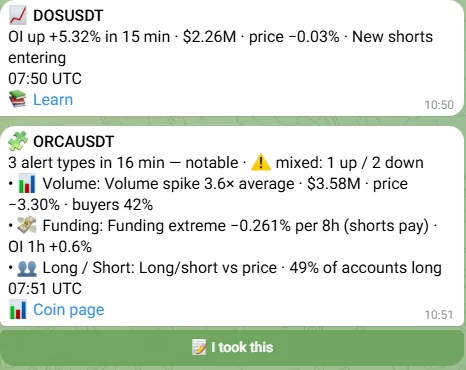
What happens when you press it
The bot records the coin, the direction of the alert and the live price at the moment you press — not the price in the alert text, which may be minutes old by then. A pop-up confirms it:
- Pop-up in Telegram
📝 Saved: LONG SOLUSDT @ 152.4. Results in 1h, 4h and 24h — under this alert. Not financial advice.
- Pressed again within 15 minutes for the same coin, alert type and direction — «Already in your journal», no second entry.
- No live price at that second — «No live price right now — try again in a minute».
Results after 1h, 4h and 24h
One, four and twenty-four hours after your press the bot replies under the same alert, in the same topic. The 24-hour reply also repeats the 1h and 4h results:
- Reply under the alertAfter 1 hour
📝 SOLUSDT LONG @ 152.4 → after 1h: 154.0 (+1.05%)
- Reply under the alertAfter 24 hours
📝 SOLUSDT LONG @ 152.4 → after 24h: 149.1 (−2.17%) · 1h +1.05% · 4h +0.33%
The numbers are an illustration of the format, not typical results.
- The percent follows the direction: for LONG a rise of the price is a plus, for SHORT a rise is a minus.
- It is the plain price change from your entry — no fees, funding or slippage.
- If the bot was down for more than 10 minutes at the moment of a check, that check is skipped rather than filled with a price from another time. The entry shows a dash for it, and a skipped 24h result does not count in the averages.
Where to see your results
/journal or «📝 Trade journal» in /settings
Your entries of the last 90 days: how many are closed (24 hours have passed) and how many are still open, the average result after 24h and after 1h, how many closed entries ended in profit, the best and the worst alert type by the 24h average, and the latest 5 entries with their 1h / 4h / 24h results. A type is ranked from 3 closed entries; the worst one shows once two types qualify.
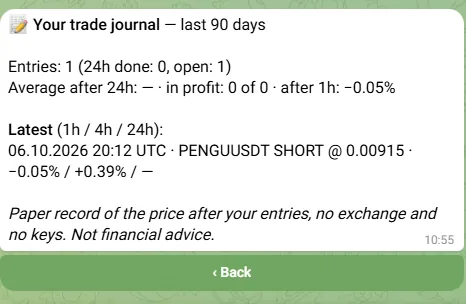
Mini App → Stats → «My journal»
The same 90 days on one screen: entries, the average after 24h with «in profit N of M», the best and the worst type and the latest entries — plus a line for the last 7 days with the week before next to it.
The weekly summary
On Mondays from 08:00 UTC the weekly alert statistics come to the ⚙️ Settings topic (to the chat in one-chat mode). If you made entries that week it ends with «📝 Your journal, 7 days: N entries · after 24h on average X · in profit W of C», the week before in brackets, and a «📝 Trade journal» button. It is on by default; /stats has the «🔔 Weekly summary» switch.
Getting something out of it
- Press it only for entries you really make — or decide in advance to note every alert of one type. A mix of both tells you little.
- Look at the best and the worst type after ten or more closed entries; with three it is mostly chance.
- Compare weeks rather than single trades: the weekly line puts this week next to the one before.
Questions
Does the bot open trades on the exchange?
No. The journal only writes down prices. The bot has no access to any exchange account, asks for no keys and places no orders.
Why is my entry price not the price in the alert?
The bot records the live price at the moment you press the button. The price in the alert is from the moment it fired, and the market has moved since.
Can I delete one entry?
Not one by one. /delete removes all your data in the bot, the whole journal included; the Privacy policy lists what is stored.
Why is there no result after 4 hours?
The bot was unavailable for more than 10 minutes at the moment of that check, so the check was skipped instead of being filled with a later price.
Why is there no button under some alerts?
Only alerts with a direction get it: Setups, Confluence with a majority direction, Pumps & Dumps and RSI divergences. Whales, liquidations, volume and the other types have no button.
Try it during the free trial
Open the bot What the bot sends →Paper record of the price after your entries. Not financial advice. Disclaimer.